











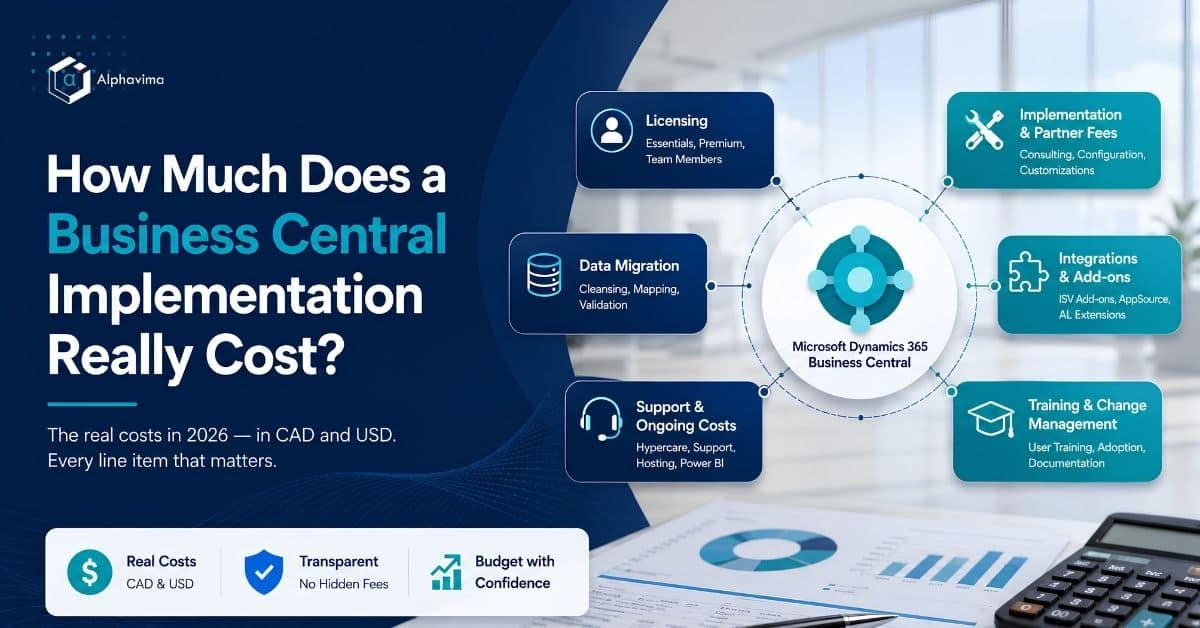
Search for Business Central implementation cost and you will find a dozen partner pages that say “it depends on your requirements” and then ask for your phone number.
It does depend. But it depends within a range, and any partner who has done a hundred of these can tell you what that range is. So we are going to tell you, in Canadian and US dollars, with the assumptions written down, and we are going to include the line items that quotes conveniently omit.
Everything below is indicative and current as of Q1 2026. It is not a quote. Use it to build a defensible internal budget and to sanity-check the quotes you receive.
Table of contents
Business Central implementation cost: the short answer
| Company profile | Implementation (one-time) CAD | Implementation (one-time) USD | Annual subscription CAD | Annual subscription USD |
|---|---|---|---|---|
| Small: under 15 users, 1 entity, finance-led, minimal inventory | $45,000 – $110,000 | $33,000 – $81,000 | $15,000 – $28,000 | $11,000 – $21,000 |
| Mid-market: 25-50 users, 1-2 entities, real inventory, 2-3 integrations | $130,000 – $320,000 | $96,000 – $237,000 | $40,000 – $90,000 | $30,000 – $67,000 |
| Complex: 75+ users, 3+ entities, manufacturing or heavy customisation, 4+ integrations | $320,000 – $800,000+ | $237,000 – $592,000+ | $110,000 – $250,000+ | $81,000 – $185,000+ |
Assumption: Canadian and US mid-market scope as of Q1 2026, USD converted at approximately 0.74. Excludes internal staff time and contingency. Confirm with a partner quote.
What this table means: if a partner quotes you CAD 60,000 for a 40-user implementation with inventory and three integrations, something has been left out of the scope. If they quote you CAD 500,000 for a 20-user finance-only project, ask them to justify it line by line.
What your Business Central implementation cost actually buys
An ERP quote has five components. Understanding the split is the first step to reading any quote intelligently.
| Component | Typical share of year-one cost | Who charges it |
|---|---|---|
| Software subscription | 20% – 30% | Microsoft, usually via a partner as your Cloud Solution Provider |
| Consulting and configuration | 40% – 50% | Your implementation partner |
| Data migration | 8% – 15% | Partner, with substantial client effort |
| Integrations and extensions | 10% – 25% | Partner and ISVs |
| Training and change management | 5% – 12% | Partner and your own team |
What this means: roughly three quarters of your year-one spend goes to people, not to software. When you negotiate hard on the licence and accept the consulting number without scrutiny, you are negotiating the wrong line.
Licensing: the part Microsoft publishes
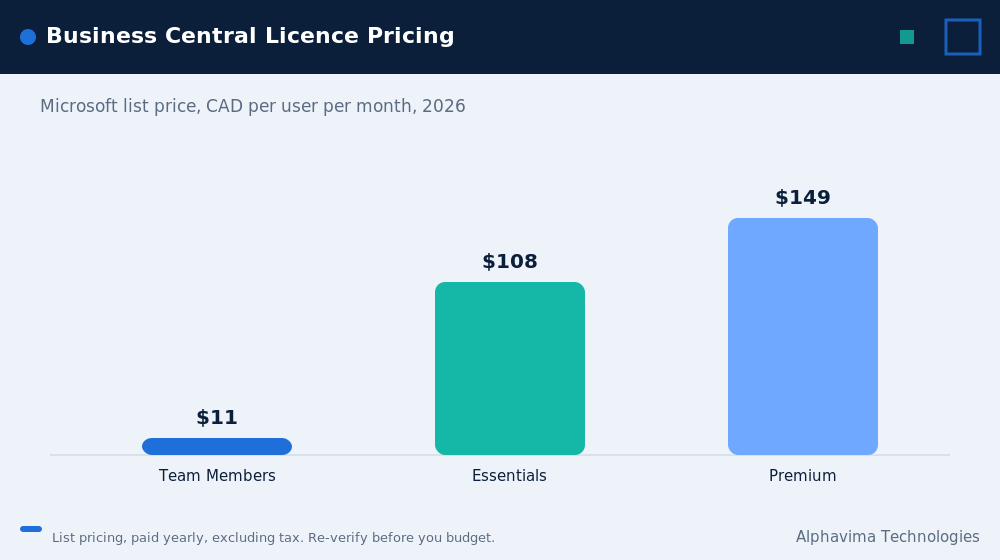
Business Central is licensed per named user. Microsoft publishes list prices, which means you can model this part yourself before speaking to anyone.
| Licence type | What it covers | Indicative list price (USD/user/month) | Indicative (CAD/user/month) |
|---|---|---|---|
| Team Members | Read data, approve, enter time and expenses, update existing records in limited ways. Cannot create sales or purchase documents | $8 | $10.90 |
| Essentials | Finance, sales, purchasing, inventory, projects, warehousing, CRM basics. This covers most companies | $80 | $108.50 |
| Premium | Everything in Essentials plus service management and manufacturing | $110 | $149.20 |
Assumption: indicative list pricing as of Q1 2026. Verify current pricing on Microsoft’s official Dynamics 365 Business Central pricing page, and note that CAD figures move with exchange rates. Partner and volume pricing may vary.
Three licensing rules that save money
- You cannot mix Essentials and Premium in the same tenant. If one person needs manufacturing, everyone with a full user licence is on Premium. This is the single biggest licensing decision you will make. Check it before you assume.
- Team Members licences are dramatically cheaper and cover more people than you think. Approvers, managers who only look at reports, and staff entering time and expenses often do not need a full licence. Audit this properly, and it can cut your licence bill meaningfully.
- Power BI Pro is separate. It is not included with Business Central. If your management reporting will run on Power BI, and it probably should, budget for those licences from day one.
Worked example: 40-user company
| Item | Users | CAD/month | CAD/year |
|---|---|---|---|
| Essentials | 25 | $2,712.50 | $32,550 |
| Team Members | 15 | $163.50 | $1,962 |
| Power BI Pro | 12 | $228 | $2,736 |
| Total | 40 | $3,104 | $37,248 |
Assumption: indicative list pricing, Q1 2026. Actual pricing depends on your agreement and the exchange rate.
What this means: the software itself is roughly CAD 33,000 a year for a 40-person company. The implementation will cost four to eight times that in year one. Focus your scrutiny accordingly.
Business Central implementation cost: full line-item breakdown (CAD and USD)
This is a mid-market reference project: 40 users, two legal entities, moderate inventory across two locations, three integrations, no manufacturing.
| Line item | Effort | CAD | USD | Notes |
|---|---|---|---|---|
| Discovery and solution design | 15-25 days | $22,500 – $43,750 | $16,650 – $32,400 | Do not let anyone skip this. A thin discovery is the root cause of most overruns |
| Environment setup and security roles | 3-6 days | $4,500 – $10,500 | $3,330 – $7,770 | Production plus sandbox |
| Finance configuration (GL, AP, AR, banking) | 20-35 days | $30,000 – $61,250 | $22,200 – $45,300 | Chart of accounts and dimension design happen here |
| Sales and purchasing configuration | 10-20 days | $15,000 – $35,000 | $11,100 – $25,900 | |
| Inventory and warehousing | 15-30 days | $22,500 – $52,500 | $16,650 – $38,850 | Costing method decisions belong here |
| Data migration | 12-25 days | $18,000 – $43,750 | $13,320 – $32,400 | Partner effort. Your own cleansing effort is on top and is not in this number |
| Integrations (3 systems) | 15-35 days | $22,500 – $61,250 | $16,650 – $45,300 | The most volatile line on this table |
| AL extensions / customisation | 10-30 days | $15,000 – $52,500 | $11,100 – $38,850 | Every customisation is also a permanent maintenance liability |
| Power BI reporting build | 8-18 days | $12,000 – $31,500 | $8,880 – $23,300 | |
| Testing support (two UAT cycles) | 8-15 days | $12,000 – $26,250 | $8,880 – $19,400 | |
| Training (role-based) | 8-15 days | $12,000 – $26,250 | $8,880 – $19,400 | |
| Cutover and go-live support | 5-10 days | $7,500 – $17,500 | $5,550 – $12,950 | |
| Hypercare (4-6 weeks) | 8-15 days | $12,000 – $26,250 | $8,880 – $19,400 | Through the first month-end close, not just to go-live day |
| Project management (~15% of effort) | included | $30,000 – $75,000 | $22,200 – $55,500 | Often a separate line. Check whether your quote includes it |
| Subtotal (partner services) | ~137-279 days | $235,500 – $563,250 | $174,300 – $416,800 | |
| Contingency at 15% | $35,300 – $84,500 | $26,100 – $62,500 | Budget it. You will use it | |
| Year-one subscription (40 users) | $33,000 | $24,400 | From the worked example above | |
| Year-one total | $303,800 – $680,750 | $224,800 – $503,700 |
Assumption: blended day rate of CAD 1,500 / USD 1,110. Two entities, moderate complexity, three integrations, no manufacturing, Q1 2026. Excludes internal staff time. Confirm with a partner quote.
What this means: the reference project sits at the upper end of our mid-market range because it includes contingency and project management explicitly. Many quotes exclude both. When you compare two quotes, check whether project management and contingency are in or out before you compare the totals.
Business Central implementation price by company size
| Tier | Users | Entities | Scope | Duration | CAD | USD |
|---|---|---|---|---|---|---|
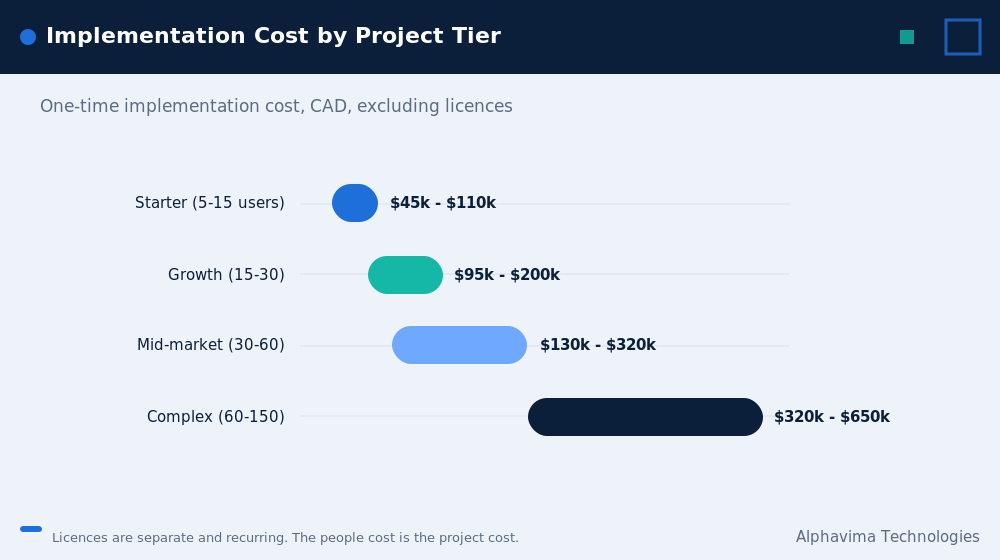
| Starter | 5-15 | 1 | Finance, basic sales and purchasing | 8-12 weeks | $45,000 – $110,000 | $33,000 – $81,000 |
| Growth | 15-30 | 1-2 | Finance, inventory, 1-2 integrations, Power BI | 12-18 weeks | $95,000 – $200,000 | $70,000 – $148,000 |
| Mid-market | 30-60 | 2-3 | Full finance and operations, inventory, 3 integrations, custom extensions | 16-26 weeks | $130,000 – $320,000 | $96,000 – $237,000 |
| Complex | 60-150 | 3-6 | Manufacturing, multi-warehouse, 4+ integrations, heavy customisation | 26-40 weeks | $320,000 – $650,000 | $237,000 – $481,000 |
| Enterprise-adjacent | 150-300 | 6+ | Multi-country, multi-currency, complex consolidation | 40-60 weeks | $650,000 – $1,200,000+ | $481,000 – $888,000+ |
Assumption: indicative Canadian and US ranges as of Q1 2026, excluding subscription and internal staff time. Above roughly 300 users, evaluate Dynamics 365 Finance & Operations instead.
Dynamics 365 implementation cost, module by module
Useful when you are phasing a project, which you probably should be.
| Module | Consulting days | CAD | USD |
|---|---|---|---|
| Core finance (GL, AP, AR, bank, fixed assets) | 20-35 | $30,000 – $52,500 | $22,200 – $38,900 |
| Sales and receivables | 8-15 | $12,000 – $22,500 | $8,880 – $16,650 |
| Purchasing and payables | 8-15 | $12,000 – $22,500 | $8,880 – $16,650 |
| Inventory (single location) | 10-18 | $15,000 – $27,000 | $11,100 – $20,000 |
| Warehousing (multi-location, bins, directed pick) | 15-30 | $22,500 – $45,000 | $16,650 – $33,300 |
| Manufacturing (Premium) | 20-45 | $30,000 – $67,500 | $22,200 – $50,000 |
| Jobs / project accounting | 12-25 | $18,000 – $37,500 | $13,320 – $27,750 |
| Service management (Premium) | 12-25 | $18,000 – $37,500 | $13,320 – $27,750 |
| Power BI reporting | 8-20 | $12,000 – $30,000 | $8,880 – $22,200 |
| Power Automate workflows | 3-10 | $4,500 – $15,000 | $3,330 – $11,100 |
| Each integration | 5-15 | $7,500 – $22,500 | $5,550 – $16,650 |
| Data migration | 10-30 | $15,000 – $45,000 | $11,100 – $33,300 |
Assumption: blended day rate CAD 1,500 / USD 1,110, mid-market complexity. Heavily non-standard processes can double these.
What this means: you can build a credible estimate by adding up only the modules you actually need. Do that before your first partner call, and you will spot padding immediately.
Consultant day rates
Day rates drive most of your Business Central implementation cost. Partners rarely publish them. Here are indicative ranges.
| Role | Canada / US (CAD/day) | Canada / US (USD/day) | Offshore blended (CAD/day) |
|---|---|---|---|
| Solution architect | $1,900 – $2,800 | $1,400 – $2,070 | $900 – $1,400 |
| Senior functional consultant | $1,500 – $2,200 | $1,110 – $1,630 | $700 – $1,100 |
| Functional consultant | $1,100 – $1,700 | $815 – $1,260 | $500 – $850 |
| Technical / AL developer | $1,300 – $2,000 | $960 – $1,480 | $550 – $950 |
| Data migration specialist | $1,100 – $1,700 | $815 – $1,260 | $500 – $850 |
| Project manager | $1,300 – $1,900 | $960 – $1,410 | $650 – $1,000 |
| Blended project rate | $1,300 – $1,800 | $960 – $1,330 | $650 – $1,000 |
Assumption: indicative North American market rates, Q1 2026. Rates vary by region, partner size and specialisation.
A word on offshore and blended delivery. Blended onshore/offshore models genuinely reduce cost, and Alphavima runs one across Canada, the USA, the UK, the UAE and India. But the saving is real only if the onshore architect and functional lead stay close to the client. A project delivered entirely offshore, with no local functional ownership, tends to produce a technically correct system that does not match how the business actually works. Ask any partner exactly who does what, and where.
The Business Central implementation cost items quotes leave out
This is the checklist to run against every quote you receive.
- Internal staff time. Your finance manager spending two days a week for six months is real money. Typical impact: 20% to 30% of true project cost. No partner quote includes it. Budget it internally.
- Power BI Pro licences. Not included with Business Central. Impact: CAD 190 per user per year.
- ISV add-on subscriptions. Payment processing, EDI, document management, advanced warehousing, tax engines. Impact: CAD 5,000 to 40,000 per year.
- Additional sandbox environments. One is included. More cost extra. Impact: low, but it appears as a surprise.
- Change requests. Every project has them. Impact: 10% to 25% of the original quote if discovery was thin.
- Hypercare beyond go-live. Many quotes end at go-live day. You need support through the first month-end close. Impact: CAD 12,000 to 26,000.
- Post-go-live managed support. Impact: CAD 18,000 to 60,000 per year.
- Update testing. Business Central updates twice a year and updates are not optional. Somebody must regression-test. Impact: CAD 5,000 to 15,000 per year.
- Data cleansing. Almost always the client’s job, always underestimated. Impact: 100 to 400 internal hours.
- Backfill. If your best finance person is on the project half-time, who is doing their job? Impact: varies, frequently ignored.
- Contingency. Impact: budget 15% to 20%. You will use it.
What drives your Business Central implementation cost up
Ranked by how much they actually move the number, in our experience.
| Cost driver | Impact | Why |
|---|---|---|
| 1. Integrations | Very high | Every system you connect adds effort, testing, and permanent maintenance. This is the line that most often blows the budget |
| 2. Non-standard processes | Very high | Every “we do it differently here” becomes an AL extension, and every extension is a permanent liability |
| 3. Manufacturing scope | High | Premium licence, plus routings, BOMs, capacity planning, shop floor |
| 4. Number of legal entities | High | Multiplies configuration, testing and migration work |
| 5. Data quality | High | Bad master data is a tax on every phase of the project |
| 6. Volume of history migrated | Medium to high | Almost entirely avoidable. Migrate two years, archive the rest |
| 7. Number of users to train | Medium | Linear, and easy to underestimate |
| 8. Reporting complexity | Medium | Often deferred, then it surfaces as a problem in week eighteen |
| 9. Multi-currency and multi-country | Medium | Tax, statutory reporting, localisation |
| 10. Decision-making speed on your side | Medium to high | The cheapest cost driver to fix, and the one clients control entirely |
Practitioner observation: the fastest way to reduce cost is not to negotiate the day rate. It is to reduce the number of integrations, resist customisation, and make decisions quickly.
Ongoing Business Central implementation cost after go-live
Budgets that stop at go-live are budgets that fail in month seven.
| Annual cost | CAD | USD |
|---|---|---|
| Business Central subscription (40 users) | $37,200 | $25,400 |
| Power BI Pro (12 users) | $2,700 | $2,000 |
| ISV add-on subscriptions | $5,000 – $40,000 | $3,700 – $29,600 |
| Managed support (partner) | $18,000 – $60,000 | $13,300 – $44,400 |
| Update regression testing (twice yearly) | $5,000 – $15,000 | $3,700 – $11,100 |
| Enhancements and small change requests | $15,000 – $50,000 | $11,100 – $37,000 |
| Total annual run rate | $82,900 – $204,900 | $59,200 – $149,500 |
Assumption: 40-user mid-market company post go-live, Q1 2026. Enhancement spend varies enormously depending on appetite.
What this means: plan for an ongoing run rate of roughly two to three times your bare subscription cost. Companies that budget only for licences are the ones that freeze their system in year two because there is no money to improve it.
Fixed price vs time and materials: how each affects your Business Central implementation cost
| Model | You carry the risk of | Partner carries the risk of | Best when |
|---|---|---|---|
| Fixed price | Scope you forgot to specify (it becomes a change order) | Their own estimation error and inefficiency | Scope is genuinely well understood after a paid discovery |
| Time and materials | Overruns of any kind | Very little | Scope is genuinely uncertain, and you trust the partner |
| Fixed-range (capped T&M) | Some, shared | Some, shared | Most mid-market projects. This is usually the fairest model |
Our recommendation: run a paid discovery first, then get a fixed-range estimate. A partner who offers a fixed price without a proper discovery is either padding heavily to cover their risk, or setting you up for change orders. Both cost you money. A paid discovery typically costs CAD 15,000 to 40,000 and is the best money you will spend on the project.
Build your own ERP implementation budget in 30 minutes
Do this before you talk to any partner. It will change how you read every quote.
Step 1: Count your licences. How many people need to create transactions (Essentials or Premium)? How many only approve or view (Team Members)? Multiply by the list prices above.
Step 2: Decide Essentials or Premium. Do you need manufacturing or service management? If yes, everyone with a full licence is on Premium. If no, Essentials.
Step 3: Add up your modules. Using the “cost by module” table, add only the modules you will actually configure in phase one. Be honest. Nobody uses everything.
Step 4: Count your integrations. List every system Business Central must talk to. Multiply by CAD 7,500 to 22,500 each. This number will be higher than you want it to be. That is the point.
Step 5: Add data migration. CAD 15,000 to 45,000, depending on data volume and quality. If your master data is a mess, take the upper number.
Step 6: Add training. Roughly CAD 300 to 600 per user for proper role-based training.
Step 7: Add project management. 15% of the total consulting figure.
Step 8: Add contingency. 15% to 20% of everything above.
Step 9: Add internal cost. Estimate the days your own team will spend, and cost them at their fully loaded rate. This is typically 20% to 30% of the partner figure.
Worked example, 30-user distributor, one entity, two warehouses, two integrations:
| Item | CAD |
|---|---|
| Core finance | $40,000 |
| Sales and purchasing | $28,000 |
| Inventory and warehousing | $35,000 |
| Power BI reporting | $18,000 |
| 2 integrations | $28,000 |
| Data migration | $25,000 |
| Training (30 users) | $13,500 |
| Subtotal | $187,500 |
| Project management (15%) | $28,000 |
| Contingency (15%) | $32,000 |
| Partner cost estimate | $247,500 |
| Internal staff time (25%) | $62,000 |
| True project cost | $309,500 |
| Year-one subscription | $28,000 |
| Year-one total | $337,500 |
Assumption: indicative, Q1 2026. Your quote will differ. But if a quote comes in at CAD 90,000 for this scope, you now know to ask what has been left out.
Implementation timeline
| Phase | Weeks | Typical partner days |
|---|---|---|
| Discovery and design | 1-4 | 15-25 |
| Environment and configuration | 3-12 | 40-70 |
| Data migration | 6-16 | 12-25 |
| Integrations and extensions | 8-18 | 25-65 |
| Reporting build | 10-18 | 8-20 |
| UAT (two cycles) | 16-20 | 8-15 |
| Training | 18-22 | 8-15 |
| Cutover and go-live | 22-24 | 5-10 |
| Hypercare through first close | 24-30 | 8-15 |
Go live at a period end. Never mid-month, never in your peak season, and never in the week before year-end.
Budgeting checklist for Business Central cost in Canada
- Licence count split correctly between Essentials, Premium and Team Members.
- Premium decision made deliberately (remember: no mixing with Essentials).
- Power BI Pro licences budgeted separately.
- Every integration listed by name, with an owner.
- Data migration scope agreed in writing: how many years, what objects, who cleanses.
- Project management explicitly in or out of the quote (check this).
- Hypercare through the first month-end close, in scope.
- Post-go-live support contract priced.
- Twice-yearly update regression testing budgeted.
- ISV subscription costs identified and priced.
- Change request process and day rate agreed upfront.
- 15% to 20% contingency in the budget, and protected.
- Internal staff time estimated and communicated to the executive team.
- Backfill plan for key project staff.
- Three quotes obtained, normalised to the same scope before comparison.
Myths vs facts
| Myth | Fact |
|---|---|
| “Business Central is cheap because the licence is cheap.” | The licence is 20% to 30% of year-one cost. Three quarters of the spend is people. |
| “Cloud ERP means no ongoing IT cost.” | Business Central updates twice a year, and updates are not optional. Somebody must regression-test. Budget CAD 5,000 to 15,000 a year for it. |
| “We can compare two quotes by looking at the totals.” | You cannot. Normalise the scope first. Two quotes with a 2x difference are usually pricing different projects, not the same project differently. |
| “The cheapest quote saves us money.” | It usually costs the most. Low bids come from thin discoveries, and thin discoveries produce change orders. |
| “Power BI comes with Business Central.” | Power BI Pro licences are purchased separately. |
| “We can mix Essentials and Premium licences.” | You cannot, within a single tenant. If anyone needs manufacturing or service, every full user is on Premium. |
| “Customisation is a one-time cost.” | Every AL extension is a permanent maintenance liability, tested twice a year, forever. |
| “Internal time is free.” | It is the most expensive resource in the project, and the only one nobody puts in the budget. |
| “We will train everyone the week before go-live.” | You will not, and the first month-end will show it. |
Get a Business Central quote you can actually compare
We will scope your project properly, show you the line items most quotes leave out, and give you a number you can take to your board.
Common Business Central implementation cost mistakes
- Negotiating the licence and not the scope. The licence is the small number and the fixed one. The scope is the big number and the flexible one.
- Skipping the paid discovery. It costs CAD 15,000 to 40,000 and it is the best value in the entire project. A quote without one is a guess with a decimal point.
- Comparing quotes without normalising scope. Build a single scope document, send it to three partners, compare like for like. Otherwise you are comparing nothing.
- Choosing the cheapest bid. In ERP, the low bid usually means the partner did not understand the project. You pay the difference later, at change-order rates.
- Not budgeting internal time. Then wondering in month four why the finance team is behind on everything.
- No contingency, or a contingency that gets spent on scope creep in month two. Protect it.
- Customising instead of adopting. Every “we have always done it this way” that becomes an extension is a permanent cost. Challenge every one.
- Migrating too much history. Two years of detail. Archive the rest. This is free money.
- Forgetting hypercare. The project ends after the first successful month-end close, not on go-live day.
- Budgeting nothing for year two. Systems that get no enhancement budget get abandoned by their users.
Expert recommendations on Business Central implementation cost
Build your own estimate before you take a single sales call. Use the 30-minute method above. You will negotiate from a position of knowledge, and you will immediately spot both padding and omissions.
Pay for a proper discovery. Then ask for a fixed-range estimate against the discovery output. This is the commercial model that best balances risk between you and your partner.
Get three quotes against one scope document that you wrote. Not three quotes against three different partner-written scopes. That comparison is meaningless, and it is the most common budgeting error we see.
Interview the consultants, not the salespeople. Ask who will actually be on your project, where they sit, and what else they are working on.
Reduce integrations before you reduce day rates. Cutting one integration saves more than negotiating 10% off a day rate, and it saves you maintenance cost forever.
Consider whether a vertical accelerator applies. If you are in equipment rental, utilities, nonprofit or SMB manufacturing, a pre-built solution (PREXA365, Olix365, GiveLife365, PulseNet365 respectively) removes a substantial block of custom build. If one fits, the maths changes considerably. If none fits your industry, be sceptical of anyone claiming a shortcut.
Budget for year two. A system with no enhancement budget stops improving, and a system that stops improving gets worked around. Then you are back in Excel.
Key takeaways
- Mid-market Business Central implementation cost: CAD 130,000 to 320,000 (USD 96,000 to 237,000) one-time, plus CAD 40,000 to 90,000 annual subscription.
- The licence is 20% to 30% of year-one cost. The people are the rest.
- Integration is the line item most likely to blow the budget. Non-standard processes are second.
- Internal staff time is 20% to 30% of true cost and appears in no quote.
- Budget 15% to 20% contingency and protect it.
- The cheapest quote is usually the most expensive by month nine.
- Pay for a proper discovery, then get a fixed-range estimate.
- Plan an ongoing run rate of two to three times your bare subscription cost.
Conclusion
Business Central implementation cost is not a mystery. It is arithmetic that most partners decline to show you.
Now you have the arithmetic behind any Business Central implementation cost. Build your own estimate, write your own scope, get three quotes against it, and pay for a proper discovery before anyone commits to a fixed price. Do those four things and you will not be surprised in month six, which is the only real goal of a budgeting exercise.
And if a quote comes back far below the ranges in this article, the correct response is not relief. It is a question: what has been left out?
Get a fixed-range estimate, with every line item visible
Alphavima has delivered Microsoft business applications for over 20 years across Canada, the USA, the UK, the UAE and India, and we are ISO 27001 and ISO 9001 certified. We publish our assumptions, we quote in CAD and USD, and we show you every line item, including the ones that make the number bigger.
Request a fixed-range Business Central implementation estimate. Send us your scope, or use the 30-minute method above and send us your own numbers. We will tell you where you are right, where you are optimistic, and what a realistic budget looks like.
Prefer to talk first? Book a 30-minute Business Central scoping call.
Frequently asked questions
How much does Business Central cost per user?
Indicatively, as of Q1 2026: Team Members around USD 8.00 (CAD 10.90) per user per month, Essentials around USD 80.00 (CAD 108.50), Premium around USD 110.00 (CAD 149.20). Verify current pricing on Microsoft's official pricing page. You cannot mix Essentials and Premium within a single tenant.
What is the total cost of a Business Central implementation?
For a mid-market company of 25 to 50 users, expect CAD 130,000 to 320,000 (USD 96,000 to 237,000) one-time, plus CAD 40,000 to 90,000 per year in subscription. Small finance-only projects start around CAD 45,000. Complex manufacturing or multi-entity projects can exceed CAD 650,000.
Why do partner quotes vary so much?
Almost always because they are scoping different projects. One includes project management, contingency, hypercare and data cleansing; the other does not. Write your own scope document, send it to three partners, and compare like for like.
Is Business Central cheaper than NetSuite?
Typically yes. For comparable mid-market scope, Business Central usually lands 25% to 40% below NetSuite on five-year total cost of ownership. The gap narrows if NetSuite replaces multiple separate systems.
How long does a Business Central implementation take?
Eight to twelve weeks for a small finance-only project. Sixteen to twenty-six weeks for a typical mid-market rollout. Twenty-six to forty weeks with manufacturing, multiple entities or heavy customisation.
What are the hidden costs?
Internal staff time (20% to 30% of true project cost), Power BI Pro licences, ISV subscriptions, change requests, hypercare beyond go-live, twice-yearly update regression testing, and post-go-live managed support. None of these typically appear in an implementation quote.
Should I take the cheapest quote?
Usually not. In ERP, a low bid generally indicates a thin discovery and an incomplete understanding of your scope. The gap comes back as change orders at change-order rates. Compare quotes on scope completeness, not on total.
How much should I budget for contingency?
Fifteen to twenty percent. Every ERP project turns up something in week six that nobody mentioned in week one. If you do not use it, you have a pleasant surprise. If you do not budget it, you have a difficult board meeting.
What is the ongoing cost after go-live?
Plan for roughly two to three times your bare subscription cost. For a 40-user company that means CAD 79,000 to 200,000 a year, including support, ISV subscriptions, update testing and enhancements.