













In one of our recent Power Apps projects, we encountered a requirement to set multiple lookup field values on the Portal Entity Form. This is a common use case for many developers, especially those who may not have extensive coding experience. To solve this, we used a simple and effective approach using JavaScript.
In this guide, we’ll walk you through the steps to programmatically set lookup field values on a Power Apps Portal form using JavaScript. This method enhances user experience and ensures data consistency by eliminating manual entry errors.
Step 1:
Right-click on the lookup field to inspect the element or press F12.
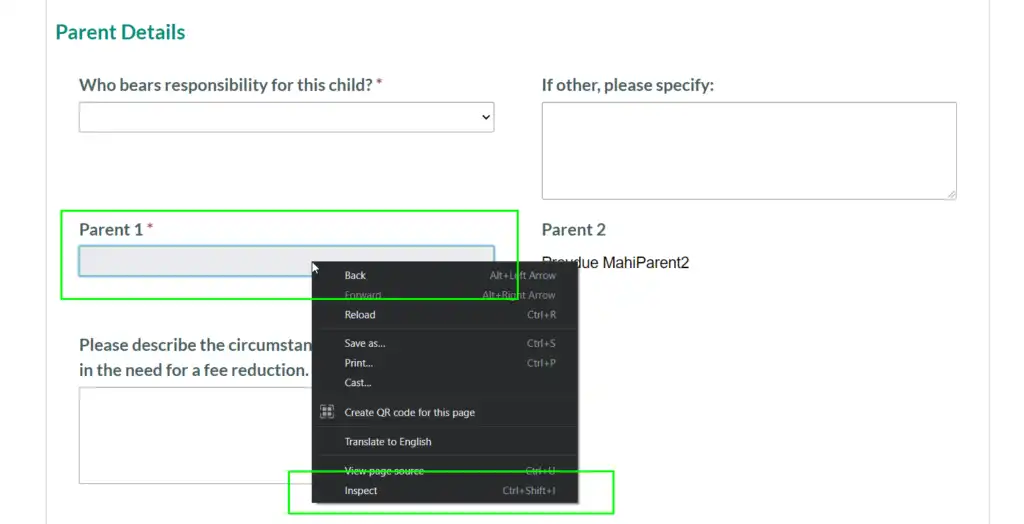
Step 2:
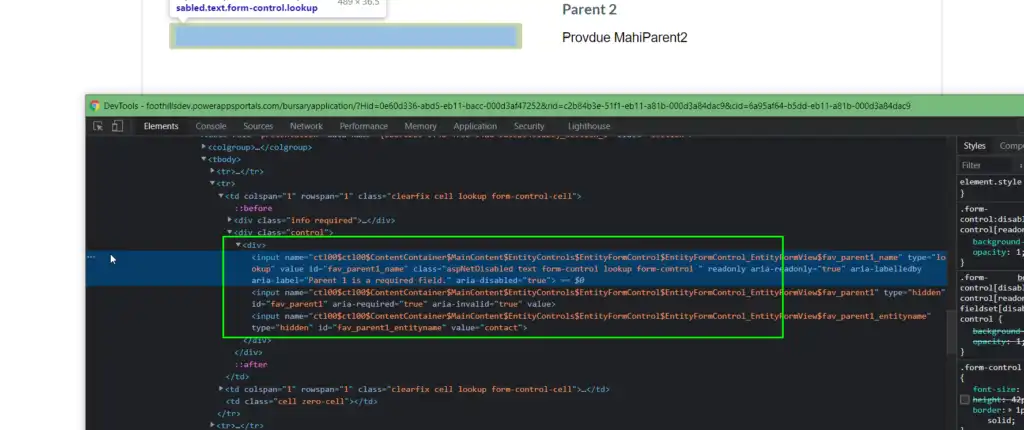
After clicking on “Inspect,” a Developer Command window will open. And from the Inspect Element window, we have to get the three-element IDs:
> Name input ID: fav_parent1_name
> Guid input ID: fav_parent1
> Entity Name input ID: fav_parent1_entityname
As seen in the image below, we get the lookup-field ID as per our lookup-field. Your field ID will be unique to you.
Step 3:
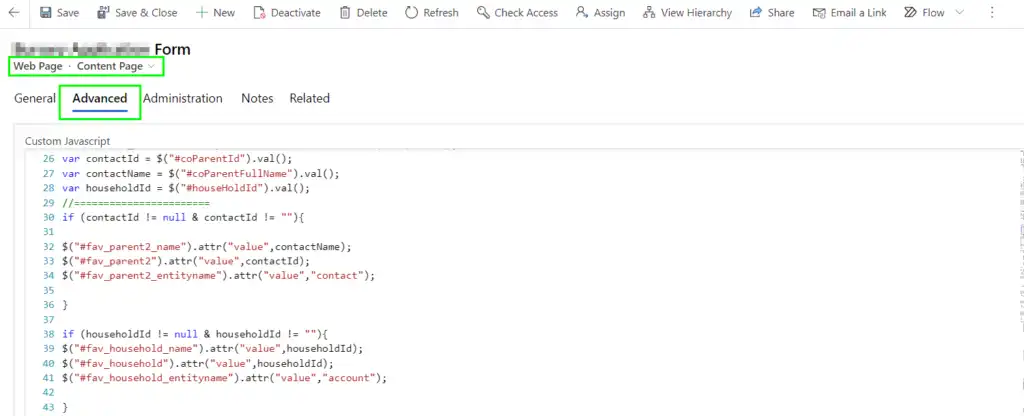
Now we have to write the JavaScript code to set the lookup field value. Navigate to your respective webpage in Portal Model-Driven App => Open Localized Content Page => Open the Advance tab => In the Custom JavaScript section, we have to write our code.
Custom Code Syntax:
$(document).ready(function () { //Contactname = String Value i.e. record name $(“#fav_parent1_name”).attr(“value”,contactName); //contactId= Guid of the record $(“#fav_parent1”).attr(“value”,contactId); //contact = entity name $(“#fav_parent1_entityname”).attr(“value”,”contact”); });
In our scenario, we are retrieving the record values and dynamically passing the values through the variables. For this, refer to the below screenshot.
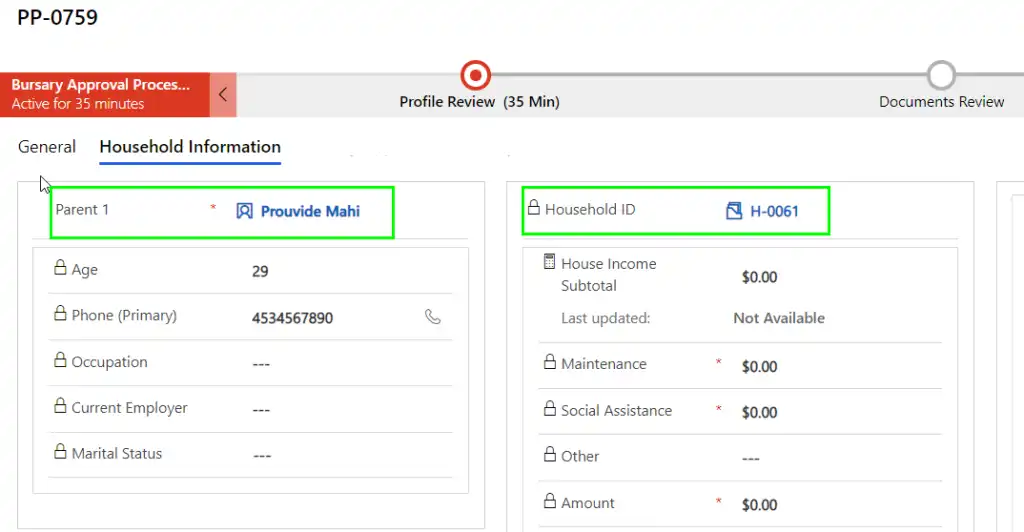
So, after clicking on the Save button on the Entity Form, the lookup-field value in the CRM will be as shown in the below screenshot.
On the Portal end, when you open a record in Edit mode, that record will display as seen below:
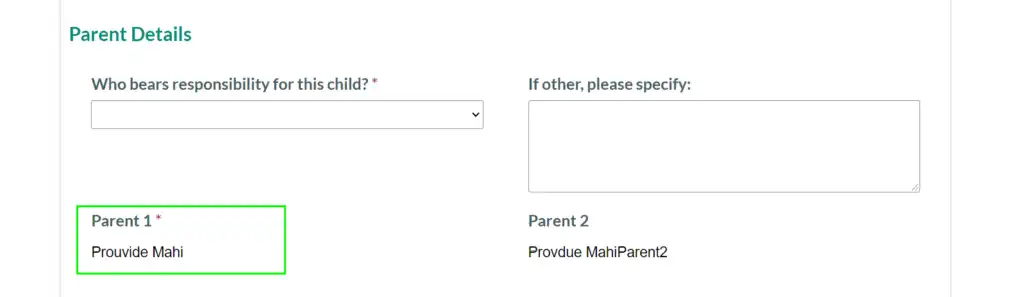
This is how, with the help of JavaScript, you can programmatically set the lookup-field value on the Entity Form.
Need help implementing custom logic in your Power Apps Portal? Our experienced team at Alphavima offers tailored Power Platform consulting to support your digital transformation goals.
Need help managing lookup fields in Power Apps Portals?
Work with Alphavima to configure and display lookup values easily within Microsoft Power Apps Portals.
FAQs
Why are lookup values important in Power Apps Portals?
Lookup values simplify data entry by linking related records without manual input. Moreover, they ensure consistency and accuracy across all portal data.
Can lookup fields be auto-populated using JavaScript in Power Apps Portal?
Yes, you can auto-populate lookup fields with JavaScript so related entity data appears automatically. As a result, teams save time and reduce human errors.
Is coding knowledge required to set lookup values in Power Apps Portals?
Basic knowledge of JavaScript and understanding of how Power Apps Portal works is helpful, but simple scripts can be reused even by non-developers. Therefore, administrators can still apply these setups with limited effort.
Can Alphavima help with custom Power Apps Portal setup?
Yes, Alphavima provides expert support for configuring lookup values and portal logic. In addition, we deliver tailored solutions to match unique business goals.
What are common issues with lookup values in Power Apps Portals?
Teams often face issues such as mismatched entity names, missing IDs, or broken scripts. Consequently, resolving these errors usually requires reviewing field mappings and permissions.
Can lookup values in Power Apps Portals be secured?
Yes, security roles in Microsoft Dataverse restrict access to lookup values based on user rights. Furthermore, compliance features ensure sensitive information remains protected.
How do lookup values improve user experience in Power Apps Portals?
They improve the user experience by reducing data errors and making forms quicker to complete. Additionally, consistent lookup options guide users to select valid records.
Can lookup values in Power Apps Portals be integrated with other Microsoft tools?
Yes, lookup values integrate with Dynamics 365, Power Automate, and Microsoft Fabric for connected workflows. As a result, businesses benefit from stronger automation and analytics.