












Microsoft Fabric has quickly become the central nervous system for enterprise data. With Copilot AI in Microsoft Fabric, teams can accelerate analytics, reporting, and decision-making without relying on complex code. From a Dynamics 365 sales manager to a supply chain analyst, anyone can ask questions in plain English, generate dashboards instantly, and access real-time insights across the Microsoft ecosystem.
This blog explores the latest updates to Copilot AI in Microsoft Fabric (as of September 2025), its integration with Dynamics 365, and how organizations can use it to improve data work.
What Is Copilot AI in Microsoft Fabric?
At its core, Copilot AI in Microsoft Fabric is a generative AI assistant embedded across Fabric workloads. Powered by Microsoft’s Azure OpenAI service (now on GPT-5), Copilot understands business context, reads metadata and schemas, and delivers answers, queries, or visualizations directly inside your workspace.
What it can do:
Interpret plain-language prompts (“Show me top customers by revenue last quarter”).
Generate SQL, DAX, and KQL queries.
Build and fix data pipelines.
Summarize performance logs, dataflows, and errors.
Suggest visuals in Power BI and even explain DAX formulas.
Create dashboards from real-time data streams.
Unlike generic AI assistants, Copilot in Microsoft Fabric is context-aware: it only works with the data you’re authorized to access, and it adapts to the workload you’re in – Data Factory, Lakehouse, Dataflows, Power BI, Real-Time Intelligence, or Notebooks.
Why Copilot AI in Microsoft Fabric Matters for Dynamics 365 Users
If your organization runs on Dynamics 365, you know the challenge: data is everywhere – CRM interactions, ERP transactions, IoT telemetry, supply chain updates. Copilot AI in Microsoft Fabric makes sense of it all, bringing analytics closer to business processes.
Example use cases:
Sales & Service: “Show me customer churn trends by region.”
Finance: “Summarize monthly cash flow anomalies.”
Supply Chain: “Highlight delayed shipments by vendor.”
Manufacturing: “Flag machines with frequent downtime.”
Copilot queries Fabric’s unified data (via OneLake, warehouses, or lakehouses) and generates insights that can be embedded directly back into Dynamics 365 dashboards or Power Apps.
Integration Highlights: Dynamics 365 + Fabric + Copilot
| Dynamics 365 Area | Fabric Capability | Copilot Outcome |
|---|---|---|
| Finance & Operations | Unified ledger + Power BI | Forecast adjustments, anomaly detection |
| Supply Chain | ERP + IoT/sensor data | Stock level optimization, shipment alerts |
| Sales & Customer Service | CRM + sentiment analytics | Churn risk detection, lead prioritization |
| Manufacturing | MES + telemetry | Predictive maintenance, downtime alerts |
What’s New in Copilot AI for Fabric (September 2025)
| Workload | Copilot Features | Status |
|---|---|---|
| Data Science & Engineering | Chat panel, code generation, error fixing, data visualization | Preview |
| Data Agent | Create Fabric data agents; connect to Copilot Studio | Preview |
| AI Functions | Enrich data with AI-driven transformations | Preview |
| Dataflows Gen2 | Generate queries, build custom columns | GA |
| Data Pipelines | Build, run, and summarize pipelines | GA |
| SQL Queries (Warehouse & DB) | Generate, fix, explain SQL | Preview |
| Power BI | Suggest visuals, explain reports, write DAX queries | GA |
| Real-Time Dashboards | Create dashboards from KQL/live streams | Preview |
| Licensing Update | Copilot now included with all paid SKUs (F2+) | Live |
September 2025 highlight: Copilot in Power BI is now turned on by default for most tenants, giving business users immediate access to generative AI without extra setup. Learn more about release status of AI and Copilot experiences in Fabric.
Copilot Across Fabric Workloads
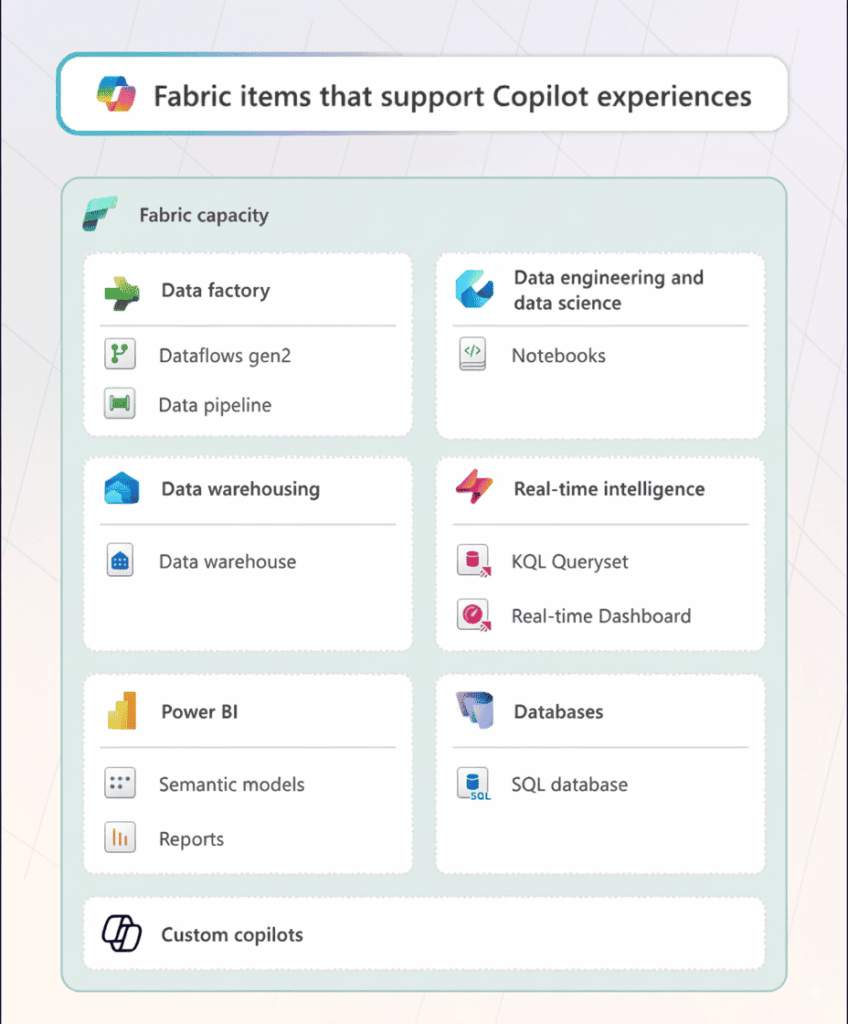
1. Data Factory: Pipelines in Plain English
Build a new pipeline with a single prompt.
Automate transformation steps like cleaning, joins, and feature engineering.
Debug errors – Copilot explains messages and suggests fixes.
Screenshot suggestion: Copilot summarizing a pipeline and offering fixes in Data Factory.
2. Dataflows Gen2: Smarter Business Logic
Generate queries automatically.
Add calculated columns by describing logic (“Add a 10% discount if total > 2000 and category = B”).
Explain queries for easier onboarding.
3. Notebooks: Code Generation for Data Science
Ask for Spark or Python code directly.
Generate ML workflows (e.g., “Build a logistic regression model for churn”).
Explain existing code blocks for learning and collaboration.
4. Lakehouse & Data Warehouse: SQL Simplified
Natural language to SQL queries.
Inline fixes and auto-joins.
Explanations for complex queries.
Example: “Show me top 5 products by sales last quarter” → Copilot writes optimized SQL with joins.
5. Power BI: Faster DAX, Richer Models
Generate DAX measures in plain English.
Suggest model relationships.
Explain and optimize existing measures.
Build semantic models from business descriptions.
6. Real-Time Analytics: Streaming Made Easy
Convert prompts into KQL queries.
Correlate anomalies in IoT or login events.
Recommend visualizations for streaming data.
Screenshot suggestion: Copilot generating a live dashboard from telemetry.
Real-Time Dashboard Creation with Copilot
One of the most powerful features for Dynamics 365 users is real-time dashboards. With Copilot in Real-Time Intelligence:
Select a live data stream (e.g., IoT from manufacturing, customer service queues).
Ask Copilot to create a dashboard.
Copilot builds:
Insights page: Key KPIs.
Data profile: Structure and statistics.
Visuals: Charts ready for action.
This bridges Fabric with Dynamics 365 operations, giving decision-makers dashboards that update continuously.
Real-World Outcomes: Copilot in Action
Vodafone: Rolled Copilot out to 68,000 employees, saving ~3 hours per user weekly.
Finastra: Reduced campaign analysis cycles from 3 months to <1.
Access Holdings: Cut ETL coding from 8 hours to 2.
Milpark Education: Reduced student support resolution time by 50%.
These stories show Copilot’s impact on efficiency and decision-making, not just technical convenience.
Responsible AI and Governance
Copilot AI in Microsoft Fabric is built with trust by design:
Only works with data you have access to.
Does not use customer data to retrain models.
Region-locked processing and audit logs for compliance.
Admin controls via Microsoft Purview for governance and data protection.
Best Practices for Getting Started
Check Licensing: Requires Fabric paid SKUs (F2+ or P1).
Enable Copilot: Switch it on in the Fabric Admin Portal.
Start Small: Use one business unit or process as a pilot.
Train Users: Teach effective prompting.
Monitor ROI: Track time saved, error rates, and adoption rates.
Final Thoughts
Copilot AI in Microsoft Fabric is not just a helper – it’s becoming a standard part of the Microsoft data stack. For Dynamics 365 organizations, it bridges CRM/ERP data with Fabric’s analytics power. Whether it’s forecasting revenue, optimizing supply chains, or building real-time service dashboards, Copilot gives teams faster insights and frees them from manual work.
If you’re ready to improve your Dynamics 365 analytics journey, now is the right time to explore Copilot AI in Microsoft Fabric.
FAQs
Ready to bring AI-driven insights into your data workflows?
Use Copilot AI in Microsoft Fabric to analyze data faster and make better decisions across your organization.
What is Copilot AI in Microsoft Fabric?
It’s an AI assistant built into Microsoft Fabric that helps generate queries, build dashboards, fix errors, and analyze data using natural language.
How does Copilot support SQL and DAX queries?
Generate natural-language queries automatically.
Fix broken SQL with explanations.
Suggest DAX formulas for KPIs.
Explain query logic for easier learning.
Do I need extra licensing for Copilot AI in Fabric?
Yes, Copilot requires a paid Fabric SKU (F2 or above) or Power BI Premium capacity. It’s not included in free trials.
What new features are available in Fabric as of September 2025?
Fabric Data Agents (Preview)
AI Functions for enrichment (Preview)
Dataflows Gen2 with query generation (GA)
Real-Time Dashboard creation (Preview)
Copilot enabled by default in Power BI
How does Copilot help in Data Factory?
Builds pipelines from descriptive prompts.
Automates transformation steps like cleaning and joins.
Debugs errors with contextual fixes.
Summarizes complex pipelines for onboarding.
Can Copilot assist in real-time analytics?
Converts plain-language prompts into KQL queries.
Correlates anomalies in IoT/logs.
Generates real-time dashboards with key KPIs.
Suggests best-fit visualizations for streaming data.
Can you use Copilot AI in Fabric with Dynamics 365?
Absolutely. Fabric surfaces Dynamics 365 data (via Dataverse) in lakehouses and warehouses, and Copilot uses it to provide insights across CRM, ERP, finance, and operations.
How secure is Copilot in Fabric?
Copilot only works with data users are authorized to access, doesn’t train on customer data, and integrates with Microsoft Purview for governance and compliance.