


 Dynamics 365Customer Engagement

Home/Copilot for Dynamics 365
Copilot and AI agents
Copilot for Dynamics 365, put to work in Indian businesses
Copilot for Dynamics 365 matches bank lines, drafts item descriptions, summarises deals and service cases, and runs agents that turn emails into quotes and purchase invoices. We prepare your data, roles and licences, then roll it out one process at a time.
 Copilot in Business Central, Sales and Customer Service, switched on and tunedSales Order Agent, Payables Agent and Copilot Studio agents piloted with guardrailsClear view of Copilot Credits and where India-hosted data is processed
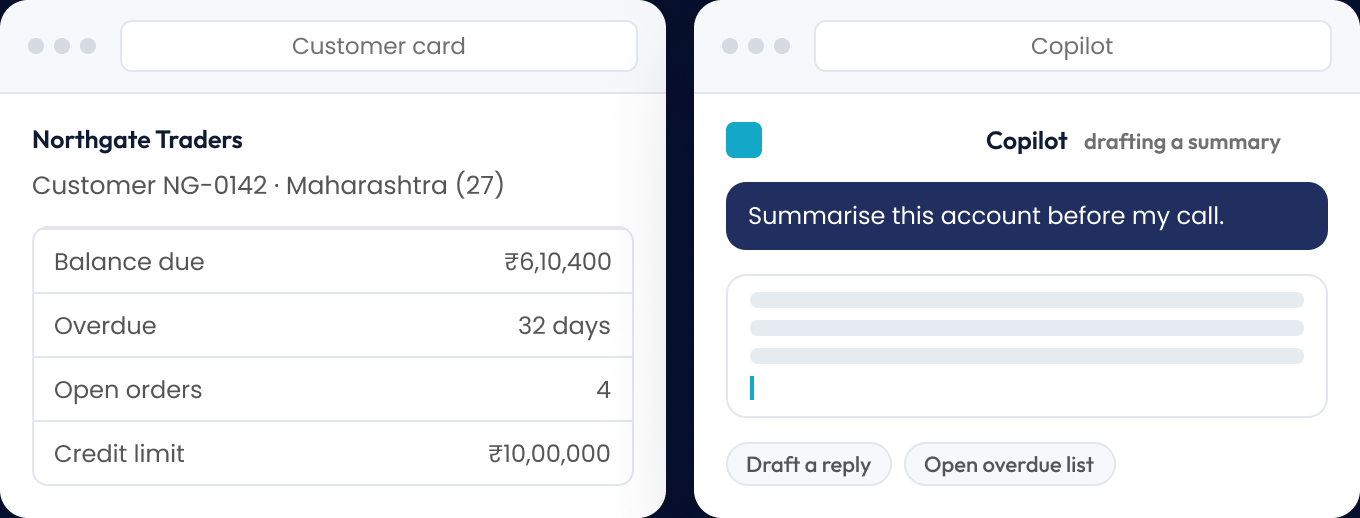
Illustration with sample data

Microsoft Solutions Partner for AI Business Solutions (formerly Business Applications) and Modern Work. ISO 27001 and ISO 9001:2015 certified.
20+
years in business
100+
Microsoft-certified consultants
100+
clients globally
97%
client satisfaction
Copilot in practice
What Copilot for Dynamics 365 does on an ordinary working day
Copilot is not a separate product to learn. It sits inside the screens your team already uses and does the slow parts of routine work: matching, summarising, drafting and finding.
In Business Central it suggests bank reconciliation matches, proposes sales lines and writes item descriptions. In Dynamics 365 Sales and Customer Service it summarises deals and cases. Agents go a step further and work through a task, such as turning a customer email into a quote, with a person approving each outgoing step.
Our job is to make that useful in an Indian business: clean masters, sensible security roles, agents that respect your approval rules, and a clear view of what runs where.
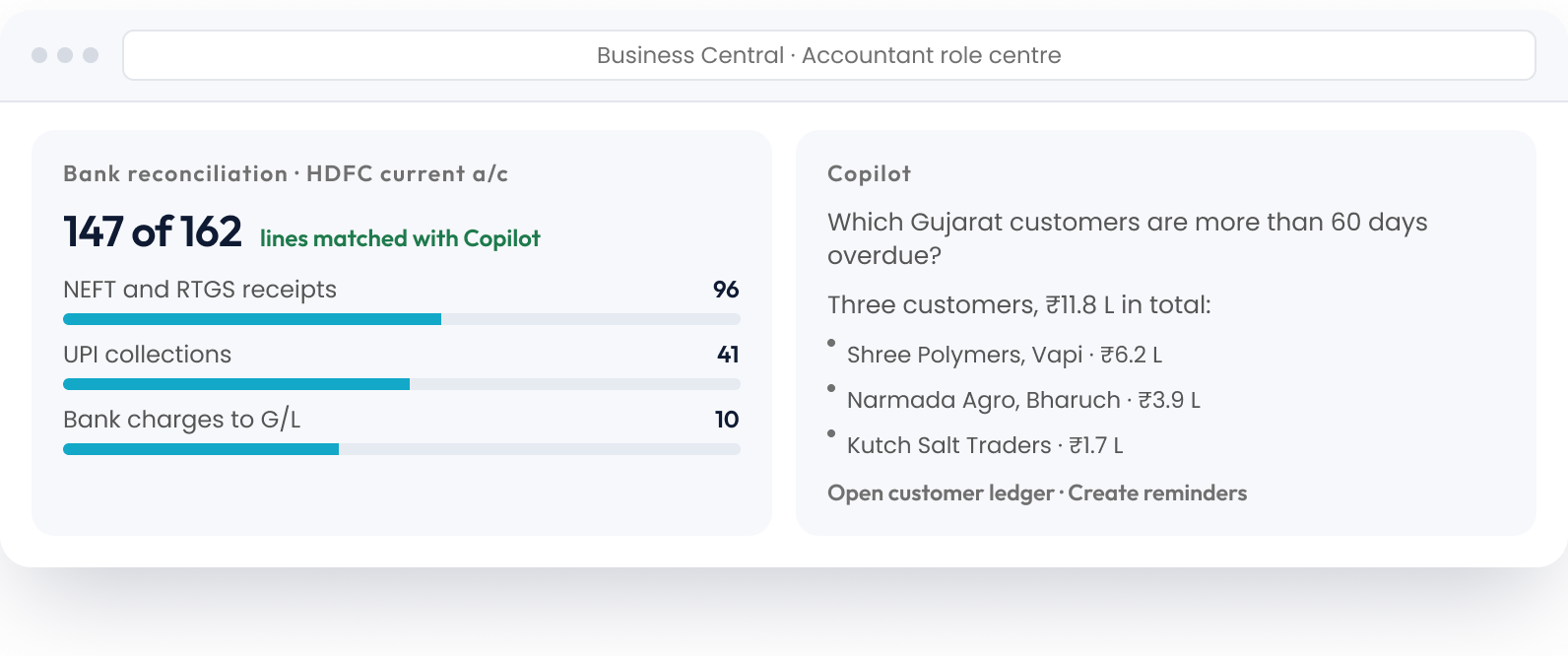
Illustration with sample data. Copilot answers only from records the signed-in user can access.
Across the Microsoft stack
Microsoft Copilot in Business Central, Sales, Customer Service and Copilot Studio
Each app has its own Copilot features, and agents are appearing across all of them. These are the capabilities we switch on and tune most often, and what each one changes for the person doing the job.
In Business Central
Bank reconciliation matchingSales line suggestionsMarketing text for itemsChat and analysis assist on listsSales Order AgentPayables Agent
Copilot features are included in Business Central plans. Agents consume Copilot Credits.
01
Business Central: the finance and operations work
This is where Copilot pays for itself soonest, because the tasks are repetitive and the result is checkable. Bank statement lines are matched to open entries, sales lines are proposed from the item catalogue and past orders, item descriptions are drafted from item attributes, and any list can be queried in plain English.
The two agents go further. The Sales Order Agent reads customer emails and prepares quotes and orders. The Payables Agent reads supplier invoices from a shared mailbox and prepares purchase invoice drafts. Both hand the outgoing step to a named person, and new vendors stay blocked until someone approves them.
Copilot inside Business Central
02
Dynamics 365 Sales: keeping the pipeline honest
Sales managers spend more time reconstructing what happened on a deal than deciding what to do about it. Copilot summarises the opportunity, the recent emails and the changes since the last review, so a regional manager can go through a whole territory before a pipeline call rather than during it.
For a field sales team covering dealers across several states, the useful part is the summary after the visit, not another form to fill in. The record stays the source of truth, and the summary is a draft the salesperson edits.
Dynamics 365 CRM in India
In Dynamics 365 Sales
Lead and opportunity summariesWhat changed since last reviewMeeting preparationEmail drafting and thread summariesSales agent in Microsoft 365 Copilot
In Customer Service
Case and conversation summariesDraft replies from knowledge articlesAsk a question of your knowledge baseAgents for case handling and intent
03
Customer Service: fewer repeated questions
A warranty case that moves from a call centre to a supervisor to a field engineer normally costs the customer one retelling per handover. Copilot summarises the case history at each step, and drafts replies from your own approved knowledge articles rather than from the open internet.
Agents can take the first pass at classifying and routing a case. We set them up with a confidence threshold and a human review step, because the cost of a wrong route in service is a lost day, not a lost keystroke.
04
Copilot Studio: the agent only you need
Some questions are specific to your business: a dealer asking which scheme applies this quarter, an employee asking what the travel policy says, a distributor asking where an order has reached. Copilot Studio is the low-code tool for building an agent that answers those from approved documents and live records.
The agent reads the SharePoint library or policy set you point it at, calls Business Central or Dynamics 365 through connectors when it needs a real number, and is published where people already are, in Teams or on your website. Governance comes first: who can publish, what an agent may read, and what it may never do on its own.
Power Platform and Copilot Studio
In Copilot Studio
Build your own agents in low codeGround them in SharePoint and policiesGive them actions through connectorsPublish to Teams or your websiteConsumes Copilot Credits
Related: Business Central in India, Dynamics 365 CRM and data and Microsoft Fabric.
Scenarios
Six practical Copilot scenarios for Indian finance, sales and service teams
Each one starts with work your team does today and ends with a person checking the result. Pick the one closest to a job that currently eats a morning.
Collections follow-ups
Ask Copilot for overdue customers by state, by salesperson or by ageing bucket, and get an answer that links back to the ledger entries rather than to an export. Business Central’s automated reminders handle the routine letters, and Copilot in Outlook drafts the personal note for the accounts that need one.
Plain-English questions across customers, invoices and paymentsAnswers link to the records, so the next action happens in the systemReminder letters stay a standard Business Central process
Bank reconciliation
Statement lines with NEFT, RTGS and UPI narrations are matched to open entries, and Copilot proposes general ledger accounts for bank charges and interest. Your accountant reviews a shortlist instead of scrolling the ledger, and nothing posts until a person approves it.
Matches proposed line by line, with unmatched lines flagged and the reason givenIndian payment narrations handled as part of the statement importEvery proposal approved by your accountant before posting
Supplier invoices from email
The Payables Agent reads PDF invoices from a shared mailbox, identifies the vendor, and prepares purchase invoice drafts for review. New vendors stay blocked until someone approves them, so an unknown sender cannot quietly become a payee.
One shared mailbox to start, so the pilot has a clear boundaryDrafts, not postings: a person checks the lines, the tax and the GSTINRuns on Copilot Credits, with a limit set for the pilot
Item descriptions for online stores
Copilot drafts marketing text from the attributes already held on the item card. Teams listing hundreds of SKUs on their own store or on a marketplace edit a draft instead of starting from a blank box, and the text stays accurate to the product because it is written from the product record.
Written from item attributes, category and variant dataTone and length adjustable per itemUseful for retailers and distributors loading a new range
Sales call summaries
After a dealer visit or a call, Copilot summarises the opportunity, the recent email thread and the agreed next steps. The regional manager reviews a territory before the pipeline meeting, and the salesperson edits a draft rather than writing notes from memory two days later.
Summary drawn from the opportunity record and its emailsNext steps proposed, then confirmed by the person who was thereThe CRM record stays the source of truth
Service case summaries
When a warranty case moves from the call centre to a field engineer or a supervisor, Copilot summarises what has happened so far, so nobody asks the customer to repeat it. Draft replies come from your own knowledge articles, which is why keeping those articles current is part of the readiness work below.
Case history summarised at every handoverReplies drafted from approved knowledge articlesAgents classify and route with a human review step
Readiness
Getting ready for Copilot and AI agents in Dynamics 365
Copilot is only as good as the records it reads and the permissions it inherits. Most of the work before switching on agents is housekeeping that also improves the rest of the system.
Data quality
Item attributes, categories and references decide how good a sales-line suggestion is. Contact email addresses decide whether an agent can identify the customer who sent an order, because agents match by email address. Duplicate customer and vendor records turn into duplicate answers. None of this is Copilot-specific work: it is the same master data hygiene that makes reporting trustworthy.
Security roles and permissions
Copilot sees exactly what the signed-in user sees, and nothing more. That is the safeguard, and it is also the catch: an over-broad role becomes an over-broad answer, delivered much faster than before. We review role assignments and field-level security before rollout, starting with the roles that touch pricing, margins and payroll-adjacent data.
Licences and Copilot Credits
Microsoft’s India pricing page lists Copilot as included in Business Central plans. Copilot in Sales and Customer Service depends on the plan you hold. Agents and Copilot Studio consume Copilot Credits, which are billed on usage and stop the agent when they run out. We set up the billing model in the admin centre, estimate volumes for the process you are piloting, and put a limit on it. Microsoft notes that fair-use policies may apply in future. We confirm your exact position at quote.
Language, region and data movement
Some agent features are validated in English only, so we test Indian naming conventions, narrations and address formats during the pilot rather than after it. For Business Central environments in the India geography, agent processing needs an admin data movement consent setting, which is covered in the section below.
Knowledge articles and documents
Anything an agent is grounded in becomes an answer it will give. Before a Customer Service or Copilot Studio agent goes live, we go through the SharePoint libraries, policy documents and knowledge articles it can read, retire the out-of-date ones, and agree who owns keeping each set current. This is usually the single biggest piece of preparation, and the one worth starting first.
Named supervisors for every agent
An agent without an owner is a process nobody is accountable for. Each agent we set up has a named supervisor who reviews its outgoing messages and documents, a review point after the first weeks, and an agreed way to switch it off. Admins can enable or disable each Copilot and agent capability individually.
Ask for our Copilot readiness checklist: 15 checks on data, roles and credits before you switch on agents.
Adoption path
Four steps from switched off to agents in production
Start with what is included, prove value on one process, then scale.
1
Readiness workshop
Data, roles, licences and data movement settings reviewed. Two or three target processes chosen.
OutputReadiness findingsShortlist of first processes
2
Switch on built-in Copilot
Features enabled one capability at a time, with key users trained on the screens they already use.
OutputCopilot live for finance and salesBefore-and-after measure on one task
3
Pilot one agent
Sales Order Agent or Payables Agent on one mailbox, with named supervisors and a credit limit.
OutputAgent running with a review stepWritten pilot review
4
Custom agents
Copilot Studio agents for your own processes, such as dealer queries or policy questions.
OutputPublished agent in Teams or on your siteGovernance and ownership agreed
Steps one and two use capabilities included in your existing licences. Steps three and four consume Copilot Credits, which Microsoft bills on usage. Durations are set in your proposal after the readiness workshop.
Responsible AI and your data
What Microsoft commits to, and what stays under your control
- Copilot inherits each user’s permissions and cannot read data the user cannot.
- Microsoft states it does not use your prompts or business data to train its foundation models.
- Prompts and outputs may be held for up to 24 hours for abuse monitoring, and are not reviewed unless flagged.
- Features follow Microsoft’s Responsible AI principles: fairness, reliability and safety, privacy and security, inclusiveness, transparency and accountability.
- Admins switch each Copilot and agent capability on or off, and agents ask a person to approve outgoing messages.
On our side, every pilot has a named supervisor, a credit limit and a review date. We would rather switch on three capabilities that people use every day than twenty that nobody trusts.
Where processing happens for India-hosted Business Central
Per Microsoft Learn, September 2026. Arrangements change as Microsoft adds capacity, so we check the current position during the readiness workshop. For the wider picture, see Azure regions and data residency.
| Capability | Processed in | Consent |
|---|---|---|
| Copilot features | India geography | Data movement setting, on by default |
| Agent features | United States | Same setting; agents can be deactivated separately |
Lead magnet
Get a Copilot readiness check
We look at your data, your licences and the tasks worth giving to Copilot first, and send you the findings.
Common questions
Copilot for Dynamics 365 questions
Ask a consultant about features, agents or licensing. More answers on the FAQs page.
Is Microsoft Copilot in Business Central free?
Copilot features in Business Central online are included with Business Central licences at no extra cost, and Microsoft’s India pricing page lists Copilot as included in all plans. Agents such as the Sales Order Agent and Payables Agent are different: they consume Copilot Credits, which are billed on usage. Microsoft notes that fair-use policies may apply in future.
Does Copilot work with Business Central on-premises?
No. Copilot is available for Business Central online only. If you run an on-premises or privately hosted version, moving to the cloud is the first step, and our migration and upgrade service covers that path.
What is Copilot Studio and when do we need it?
Copilot Studio is Microsoft’s low-code tool for building your own AI agents. You need it when a process is specific to your business, for example a dealer asking for scheme details or an employee asking about travel policy. The agent can read approved documents, call Dynamics 365 or Business Central through connectors, and be published in Teams or on your website.
Can AI agents in Dynamics 365 act without human approval?
Agents run in the background, but the Business Central Sales Order Agent asks a designated user to review outgoing emails and documents, and the Payables Agent keeps newly created vendors blocked until someone approves them. We design every pilot with named supervisors and a review step suited to the risk of the process.
Does Copilot understand GST and Indian business terms?
Copilot works from your own data and page context, so it can answer questions about GST fields, HSN codes or state-wise balances that exist in your records. It does not replace tax logic, which stays in Business Central’s India localisation. Some features are validated in English only, so we test Indian naming and narrations during the pilot.
Client outcomes
Client outcomes delivered by Alphavima
Selected stories from Alphavima’s global client base in North America and the UK, delivered on the same Microsoft platforms we implement for businesses in India.
01 / 04
Discrete manufacturing
Production planning cycle cut from weeks to days
Production planning rebuilt on Business Central
Confidential client
Business CentralPower AppsPower BI
Wholesale distribution · USA
99%+ inventory accuracy after barcode warehouse management
Barcode warehouse management for a national distributor
Confidential client
Business CentralWarehouse ManagementEDIPower BI
Insurance and warranty · USA
Three systems for sales, warranty and claims brought into one CRM
Sales, warranty and claims on one CRM
Professional Warranty Service Corporation
Dynamics 365 CRMSelf-service portals
Healthcare
Patient record lookup across departments from minutes to seconds
Patient engagement on PulseNet365 and Dynamics 365
Confidential client
PulseNet365Dynamics 365Power Automate
Next step
Start with a Copilot readiness workshop
We review your data, security roles, licences and data movement settings, pick the first processes and plan a measured pilot.